
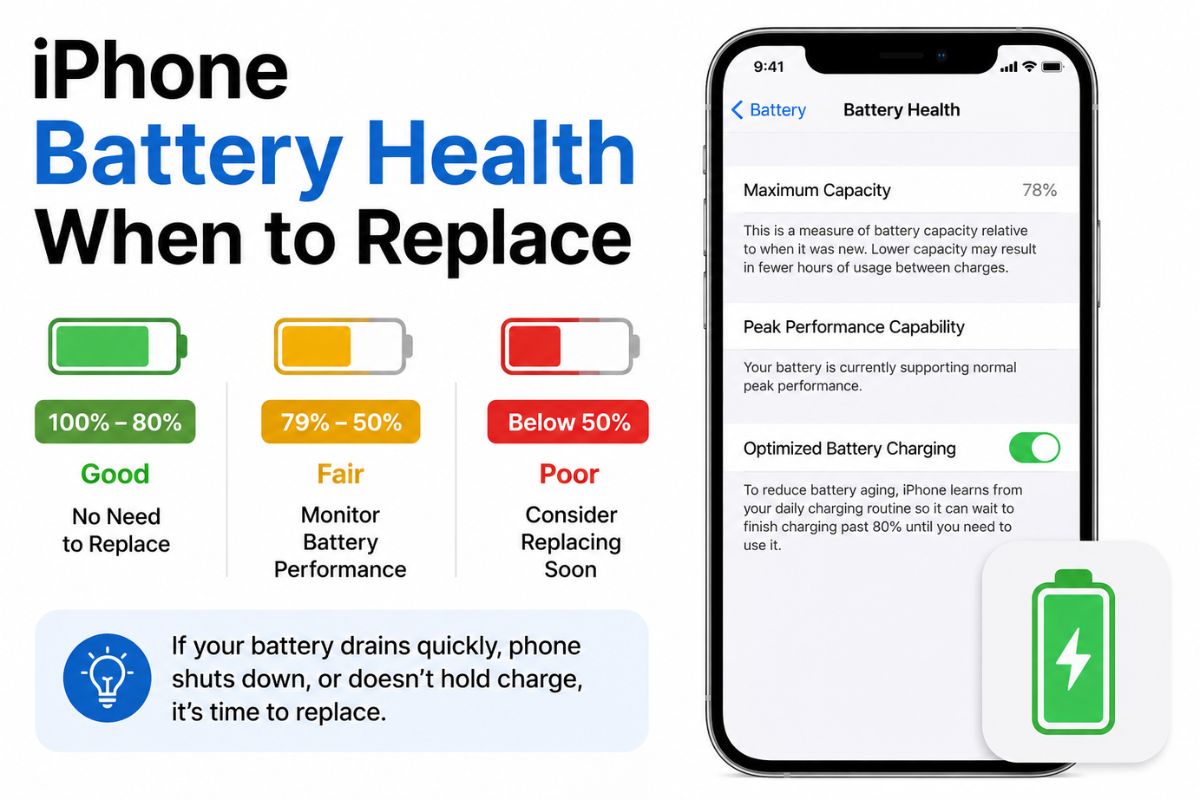
Many users want to understand iPhone Battery Health When to Replace because battery power becomes weaker over time. Your phone may not last as long as it did when it was new. Checking iPhone maximum battery capacity can help you understand the current condition of your battery. TheIphoneRepair helps iPhone users in Kuala Lumpur identify battery problems and choose the right service.
Knowing iPhone Battery Health When to Replace can prevent sudden power loss and poor phone performance. A weak battery may cause an Unexpected iPhone shutdown, slow apps, or charging problems. Replacing the battery at the right time can improve daily use and help you keep your phone for longer.
What Does iPhone Battery Health Mean?
To understand iPhone Battery Health When to Replace, you first need to know what battery health means. Battery health shows how much power your battery can hold compared with when it was new. The iPhone maximum battery capacity appears as a percentage in the Battery Health settings.
A new battery normally starts close to full capacity. This number slowly falls as the phone is charged and used. A lower percentage does not always mean you need an immediate replacement. However, Degraded battery performance may become clear when the capacity drops and the phone cannot provide stable power.
Is iPhone Battery Health 80 Percent a Warning Sign?
Many users ask about iPhone Battery Health When to Replace when the battery reaches 80%. In most cases, iPhone battery health 80 percent means the battery has lost a noticeable amount of its original capacity. Your iPhone may still work, but it may need charging more often.
You should also look at how the phone performs during the day. If the battery percentage is near 80% and your iPhone battery draining fast problem affects normal use, replacement may be helpful. The number alone is important, but real phone performance also matters.
Common Signs iPhone Battery Needs Replacement
Understanding iPhone Battery Health When to Replace becomes easier when you know the warning signs. Common Signs iPhone battery needs replacement include fast power loss, slow charging, overheating, sudden restarts, and a phone that cannot last through the day.
You may also notice that apps open slowly or the phone becomes less responsive. This can happen because the battery cannot provide enough power during demanding tasks. These problems may point to Degraded battery performance, especially when they appear together.
Why Is Your iPhone Battery Draining Fast?
One reason people search for iPhone Battery Health When to Replace is because their battery percentage drops very quickly. An iPhone battery draining fast may be caused by an old battery, high screen brightness, location services, background apps, or heavy mobile data use.
You should check battery usage in the iPhone settings before replacing the battery. This area shows which apps are using the most power. If no app explains the problem and the iPhone maximum battery capacity is low, the battery itself may need attention.
What Causes an Unexpected iPhone Shutdown?
An Unexpected iPhone shutdown can happen when the battery cannot provide enough power to the device. The phone may switch off even when the screen still shows 10%, 20%, or more. This is an important part of knowing iPhone Battery Health When to Replace.
Cold temperatures, heavy apps, and a weak battery can increase the chance of sudden shutdowns. If the problem happens regularly, do not ignore it. A technician can test the battery and check for Degraded battery performance or another internal issue.
Understanding the Battery Service Recommended Message
Your iPhone may show a Battery service recommended message in the Battery Health section. This message means the system has found that the battery condition has become weak. It does not always mean the phone will stop working immediately, but it is a clear sign to consider service.
The message can help answer iPhone Battery Health When to Replace without guessing. TheIphoneRepair can inspect the device in Kuala Lumpur and explain whether a battery change is needed. A proper test can also confirm that the issue is not caused by the charger or charging port.
What Is the iPhone Battery Cycle Count?
The iPhone battery cycle count records how many complete charging cycles the battery has used. One cycle is completed when you use a total of 100% battery power. This can happen in one day or over several days.
The cycle count is useful when learning iPhone Battery Health When to Replace because batteries naturally wear down after repeated charging. A high cycle count may be linked with lower capacity, shorter daily use, and iPhone battery draining fast.
Should You Replace the Battery Before It Reaches 80%?
You do not always need to wait for iPhone battery health 80 percent before getting service. Some batteries develop problems earlier because of heat, physical damage, charging habits, or part quality. Your phone may also show serious Signs iPhone battery needs replacement even when the capacity is above 80%.
The answer to iPhone Battery Health When to Replace should be based on both the percentage and phone performance. If the device overheats, switches off, or cannot support your daily needs, an inspection is a sensible step.
How to Check Your iPhone Battery Health
You can check battery health by opening Settings, selecting Battery, and then choosing Battery Health and Charging. This page displays the iPhone maximum battery capacity and may show a Battery service recommended message when service is needed.
Checking this area regularly makes it easier to understand iPhone Battery Health When to Replace. You should also notice changes in charging speed, battery life, temperature, and general performance. These details give a clearer picture than one number alone.
Why Professional Battery Replacement Is Safer
Replacing an iPhone battery requires suitable tools and careful handling. Opening the phone at home can damage the screen, cables, seals, or internal parts. A trained technician can check the iPhone battery cycle count, battery condition, and charging system before starting the repair.
TheIphoneRepair provides battery support for iPhone users in Kuala Lumpur. Professional service helps reduce the risk of damage and gives a clear answer about iPhone Battery Health When to Replace. The phone should also be tested after fitting the new battery.
How to Protect Your iPhone Battery
Good habits can slow down Degraded battery performance. Keep your phone away from extreme heat, use a reliable charger, and avoid leaving the device in direct sunlight. Heat is one of the main factors that can reduce battery life.
You should also update iOS, reduce unnecessary background activity, and check for apps that cause iPhone battery draining fast. These steps will not repair an old battery, but they can help a healthy battery last longer.
Conclusion
Knowing iPhone Battery Health When to Replace helps you avoid sudden shutdowns, poor performance, and repeated charging. Important warning signs include iPhone battery health 80 percent, low capacity, overheating, fast battery drain, and service messages. TheIphoneRepair offers professional battery inspection and replacement support for customers in Kuala Lumpur.
Do not judge the battery only by its percentage. Look at daily performance, charging behaviour, and any Signs iPhone battery needs replacement. A proper inspection can help you make a safe and practical decision.
Frequently Asked Questions
At What Battery Health Should I Replace My iPhone Battery?
Many users consider replacement when the battery reaches iPhone battery health 80 percent. However, replacement may be needed earlier if the phone drains quickly, overheats, or shuts down without warning.
Is 85% iPhone Battery Health Still Good?
An 85% iPhone maximum battery capacity can still be usable. The decision depends on how long the phone lasts and whether it shows performance or charging problems.
Why Does My iPhone Shut Down With Battery Left?
An Unexpected iPhone shutdown may occur when the battery cannot provide stable power. A battery test can confirm whether the battery or another phone part is causing the issue.
What Does the Service Message Mean?
A Battery service recommended message means the system has detected a weakened battery. You should arrange an inspection, especially if the phone also has short battery life or slow performance.
Can Battery Replacement Improve iPhone Speed?
Yes, replacement may improve stability when Degraded battery performance is causing the phone to slow down. The result depends on the battery condition and overall device health.
Does Charging Overnight Damage the Battery?
Modern iPhones include charging controls, but regular heat can still affect battery life. Checking the iPhone battery cycle count and using safe charging accessories can help you monitor long-term battery condition.
Can I Keep Using an iPhone With a Weak Battery?
You can continue using it if the device is safe and stable. However, serious Signs iPhone battery needs replacement, such as swelling, overheating, or frequent shutdowns, should not be ignored.